Table of Contents
The first merge at a glance
In the reviewed opening sequence, the player has three Sardine Tier 1 fishermen, receives a “Merge 3 fishermen” prompt and uses the yellow Merge pad near the waterfront. The result visible shortly afterward is a Mackerel Tier 2 fisherman. This establishes the first merge shown in that build.
The official game description also confirms that fishermen can be merged into better ones. It does not publish a complete recipe table or say that every later merge uses exactly the same requirement.
Check the three starting fishermen
Earn and hire until the opening tutorial reaches its merge instruction. Look along the water for the three Sardine Tier 1 labels. In the reviewed frame, the bottom-right counter shows Total Fishermen: 3 and the tutorial says Merge 3 fishermen. These visible signals make the first merge ready to follow.

The Merge pad sits beside the collection area, with white tutorial arrows pointing toward it. Keep the merge action separate from Hire 1, Hire 5 and the larger hire pads. Buying another hire and merging your existing workforce are different actions.
Use Merge and check the result
- Approach the yellow pad labelled Merge while following the tutorial.
- Step onto the pad and let the change complete.
- Read the worker label along the water afterward.
- Return to collecting and delivering fish so the upgraded workforce can support service.
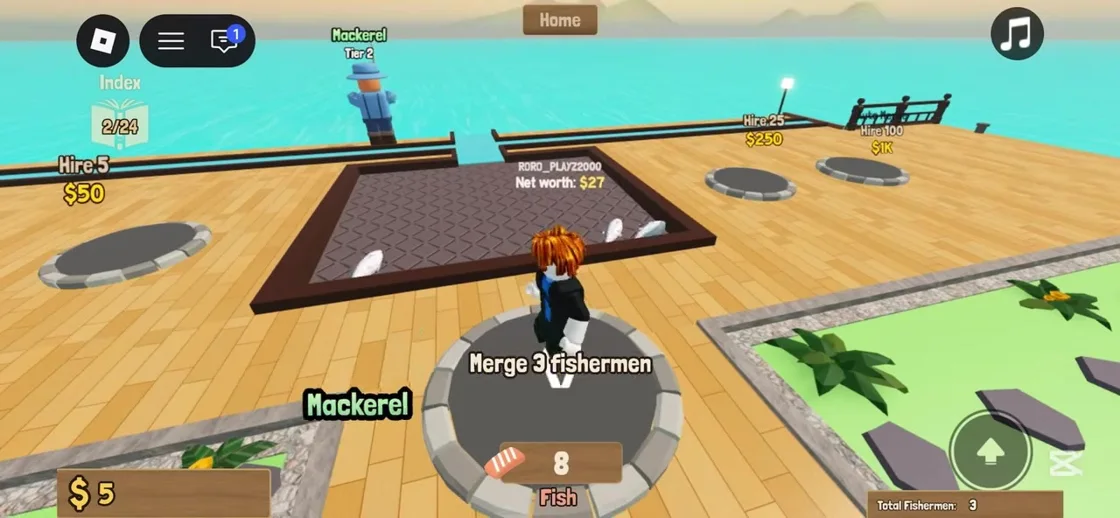
The next inspected frame shows Mackerel Tier 2 and the index changes from 1/24 to 2/24. A single frame does not establish every index entry or a full progression chart. We therefore publish the observed first result without extrapolating higher fish names, rates or recipes.
If the merge does not happen
First check that you are on the Merge pad and have reached the current tutorial requirement. Read the worker labels rather than relying only on a wallet amount. If your current build shows a different count or requirement, follow that displayed requirement.
Keep the restaurant running while you check: collect available fish, deliver them and collect money. We have not verified a reset command, hidden prerequisite, cooldown or guaranteed fix for failed merges. Rejoining is a general troubleshooting option, not a confirmed repair, and you should avoid abandoning unsaved progress.
What merging does and what remains unmeasured
Merging improves fishermen according to the developer description. The first observed result changes their named tier. That evidence supports following the tutorial merge as a progression step; it does not prove an exact income multiplier or a fastest purchase strategy.
Later merge requirements, whether all hires start at the same tier, merge selection rules and the effect of every worker type remain unverified. Use the current UI for those decisions. We will extend the table when readable gameplay or developer documentation supplies the missing details.
Continue your restaurant
Beginner guide: from your first fish to your first sale
Follow the opening tutorial through hiring, fish collection, kitchen delivery and the separate money collection step.
Read guide →Not making money? Check the restaurant handoffs
Find where the fish-to-sushi loop stopped before spending more on fishermen or upgrades.
Read guide →